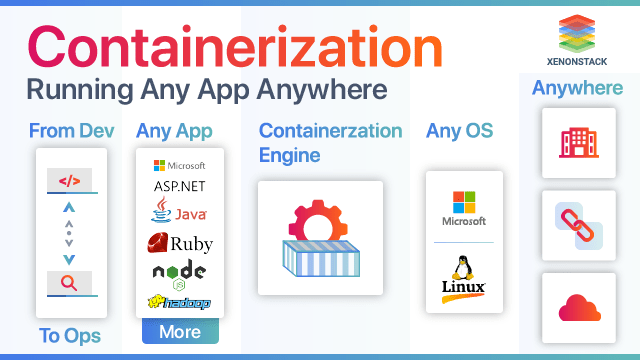
Containerization technologies let developers package applications with their dependencies into lightweight, portable units called containers. These run consistently across different environments, from laptops to production servers.
Docker remains the most widely used tool, with around 86% market share among containerization solutions. Kubernetes handles orchestration for most production deployments, with adoption rates reaching 82-93% among organizations using or evaluating containers.
This guide covers definitions, comparisons, tools, benefits, implementation, security, and trends based on current data and practices.
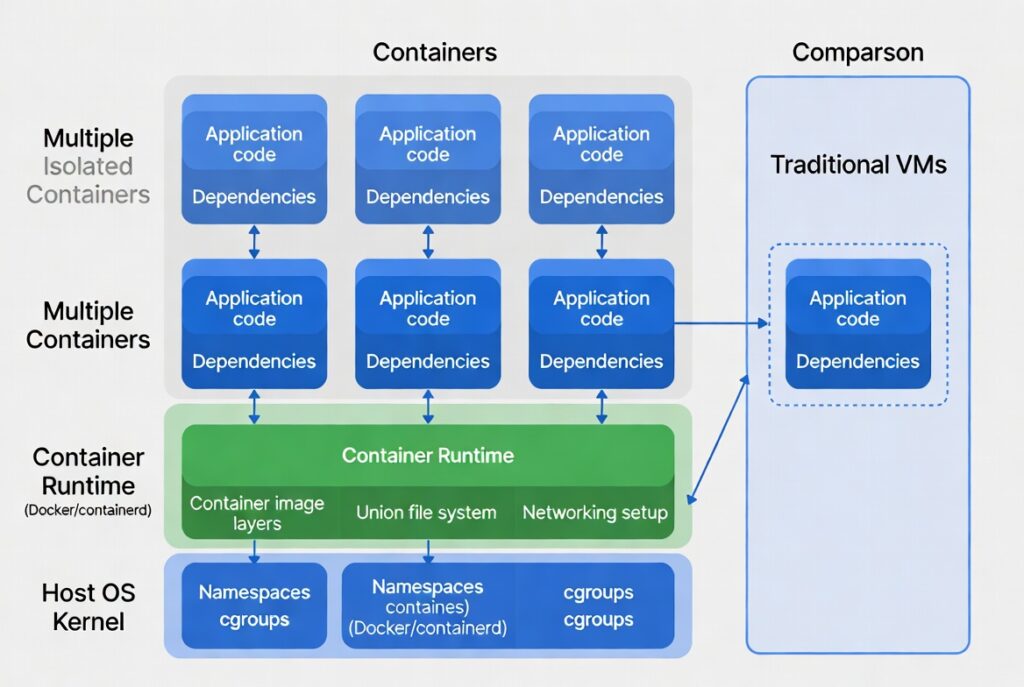
Alt text: Containerization architecture diagram illustrating shared kernel and isolated containers versus virtual machines.
What Is Containerization? Definition and Core Concepts
Containerization is operating-system-level virtualization. It isolates processes so applications run in self-contained environments that share the host operating system’s kernel.
Unlike full virtual machines, containers do not include a complete guest OS. They bundle only the application code, runtime, libraries, and configuration files. This makes them smaller and faster to start.
Key mechanisms include Linux namespaces for isolation and cgroups for resource control. The Open Container Initiative (OCI) sets standards for image formats and runtimes, ensuring compatibility across tools.
Containers solve “it works on my machine” problems by guaranteeing identical runtime conditions everywhere.
Containerization vs. Virtualization: When to Choose Each
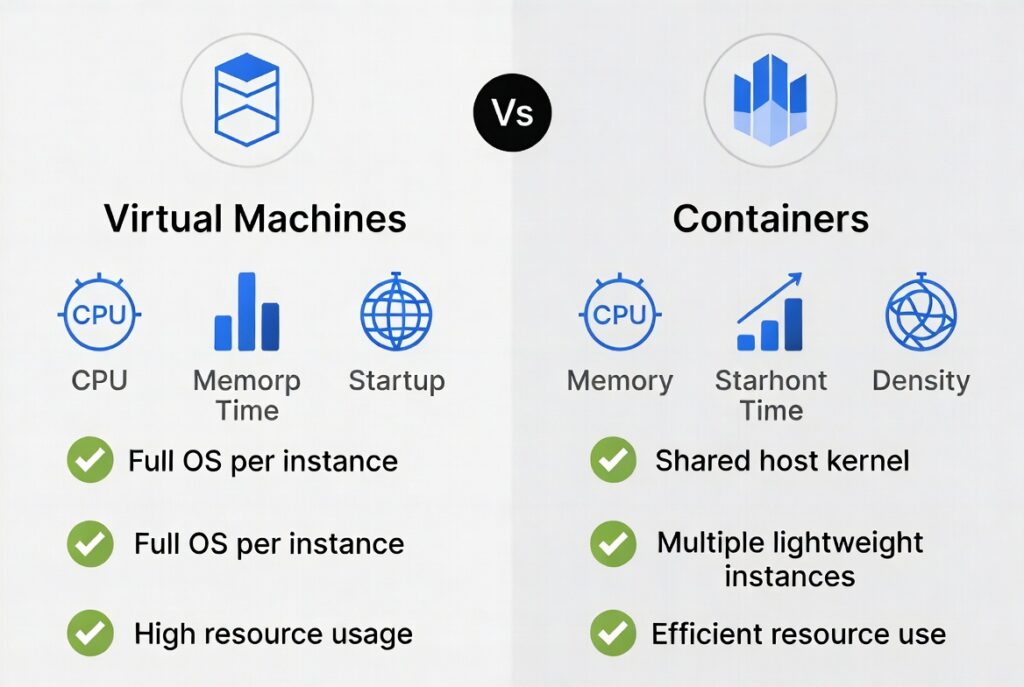
Virtual machines emulate full hardware and run independent operating systems. Containers share the host kernel and provide process-level isolation.
Key Differences:
- Resource Use: Containers have low overhead and start in milliseconds. VMs require seconds or minutes because they boot full OS instances.
- Density: You can run many more containers on one host than VMs.
- Isolation: VMs offer stronger hardware-level separation. Containers rely on kernel features, which is efficient but requires careful security configuration.
- Portability: Containers excel for consistent deployment across clouds and on-premises.
Choose containers for microservices, CI/CD pipelines, and scalable cloud-native apps. Use VMs for legacy applications needing full OS isolation or specific hardware support.
Actionable Tip: Audit your workloads. Start by containerizing non-critical services to measure resource savings before full migration.
Alt text: Infographic comparing virtual machines and containers on resource efficiency, startup speed, and density.
Key Containerization Technologies and Tools in 2026
Docker provides the most popular container runtime and build tools. Its engine manages images and containers effectively for individual developers and teams.
Alternatives include Podman for daemonless operation and containerd as a lightweight runtime. LXC offers system-level containers closer to lightweight VMs.
For orchestration, Kubernetes automates deployment, scaling, and management of containerized applications. It dominates with high production usage rates. Managed options like Amazon EKS, Google GKE, and Azure AKS reduce operational burden—79% of users prefer them over self-managed clusters.
Registries store and distribute images. Follow OCI standards for interoperability.
Practical Advice: Beginners should install Docker Desktop. For production, evaluate managed Kubernetes services first to avoid managing control planes.
Benefits of Containerization Technologies
Containers improve deployment speed and consistency. Teams deploy updates faster with less risk of environment-specific bugs.
Resource efficiency lowers infrastructure costs through higher density. Scaling becomes simpler with orchestration tools that handle replicas automatically.
Portability supports multi-cloud and hybrid strategies. Applications move between environments without modification.
Data shows 58% of organizations run mission-critical workloads in containers. Cloud-native adoption reaches 98% in many surveys, with Kubernetes powering much of it.
Real Example: A development team reduced deployment time from hours to minutes by shifting to containerized microservices, enabling daily releases instead of weekly.
How Containerization Works: Step-by-Step
Developers write a Dockerfile that defines the base image, copies code, installs dependencies, and specifies the startup command. Build the image, then push it to a registry.
At runtime, the container engine extracts the image and runs it as an isolated process. Orchestrators like Kubernetes schedule pods—groups of containers—across cluster nodes.
Basic Steps:
- Create a minimal Dockerfile using a slim base image (e.g., Alpine Linux).
- Build and test locally.
- Push to a secure registry.
- Deploy with orchestration tools using YAML manifests for deployments and services.
- Monitor with tools like Prometheus.
Optimize images by minimizing layers and removing unnecessary packages for smaller sizes and faster pulls.
Container Security Best Practices (Critical for Production)
Security starts with minimal base images and regular vulnerability scans using tools like Trivy or Grype.
Run containers as non-root users. Apply least-privilege principles with tools like Kubernetes RBAC and network policies.
Sign images and verify signatures. Use runtime protection to detect anomalies.
Checklist:
- Scan images in CI/CD pipelines.
- Pin versions instead of using “latest” tags.
- Implement secrets management (avoid environment variables for sensitive data).
- Enable auditing and monitoring.
- Update base images and runtimes promptly.
In 2026, supply chain attacks remain a concern. Integrate SBOMs (Software Bill of Materials) for transparency.
Actionable: Set up automated scanning gates in your pipeline. Reject builds with critical vulnerabilities.
Implementation Guide: Getting Started with Containerization
Assess applications for container suitability. Refactor monolithic apps into microservices where it makes sense.
Phased Roadmap:
- Pilot with Docker on a few services.
- Set up a local Kubernetes cluster (e.g., kind or Minikube) for testing.
- Implement CI/CD with GitHub Actions or similar for automated builds.
- Move to production with monitoring, logging, and persistent storage using volumes.
- Optimize costs with autoscaling and spot instances.
Common challenges include persistent storage and networking. Solutions involve CSI drivers for storage and service meshes like Istio for traffic management.
Track metrics such as deployment frequency and resource utilization to measure success.
Real-World Use Cases and Case Studies
Containerization powers microservices architectures at scale. E-commerce platforms handle traffic spikes by auto-scaling container replicas.
AI and ML workloads benefit from GPU-enabled containers and orchestration for training jobs. Many organizations run data-heavy applications in Kubernetes.
Lesson: Start small, focus on stateless services first, and invest in observability early.
Future Trends in Containerization Technologies (2026 and Beyond)
AI workloads drive further Kubernetes adoption. Platform engineering teams build internal developer platforms on top of containers.
GitOps practices with tools like Argo CD improve declarative management. WebAssembly integration offers even lighter execution environments.
Sustainability gains come from efficient resource use. Hybrid cloud setups remain common, with 87% of cloud-native environments using them.
Expect more automation in security and cost optimization (FinOps).
Conclusion and Next Steps
Containerization technologies provide practical solutions for consistent, efficient application deployment. Focus on Docker for development and Kubernetes for production while prioritizing security and observability.
Start today by containerizing one application. Refer to official Docker and Kubernetes documentation, and experiment in a safe environment. Track CNCF reports for ongoing industry insights.
This approach delivers measurable improvements in speed, cost, and reliability for most teams.